View Cart
0
INR
INR
Products
WEBSITE HOSTING
BUSINESS EMAIL HOSTING
CLOUD SERVERS
DEDICATED SERVERS
RESELLER HOSTING
SSL CERTIFICATES
JUNK FREEZER
Domains
Register a New Domain
Transfer Domains to Us
-----
Domain Pricing
Website & Security
Support
Contact Us
-----
Network Status
Knowledgebase
News
Login
Plesk 12 Customer How to change Plesk Panel password ?
Portal Home
Knowledgebase
2) Plesk 12 Tutorials
Website Hosting
Plesk Password
Plesk 12 Customer How to change Plesk Panel password ?
Support
My Support Tickets
Announcements
Knowledgebase
Downloads
Network Status
Open Ticket
To change Plesk Panel password:
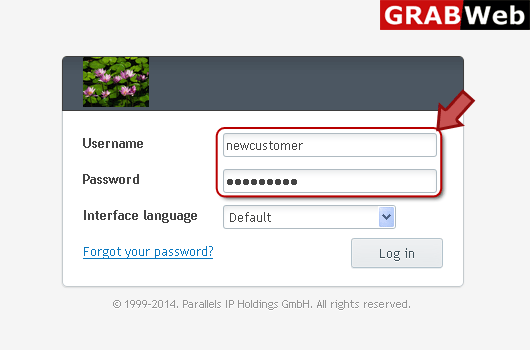
1) Login in to your Plesk Control Panel.
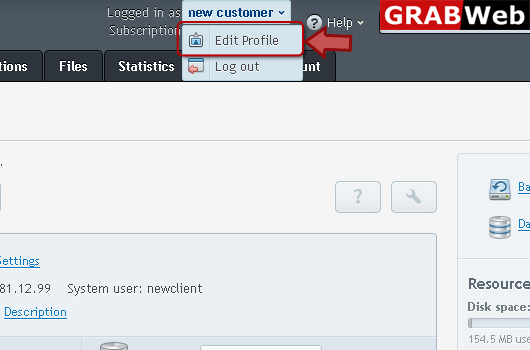
2) Click on the username in front of Logged in as then click on Edit Profile as marked in red.
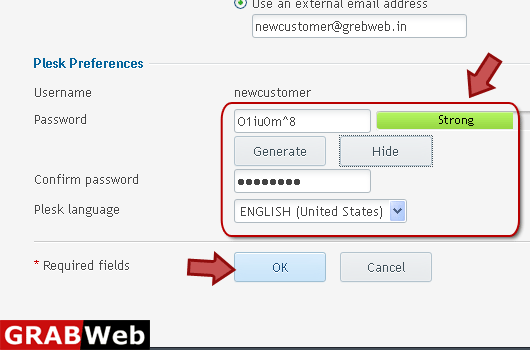
3) Change password in the red marked box then press OK.
Was this answer helpful?
0 Users Found This Useful (0 Votes)
Yes
No
Generate Password
Please enter a number between 8 and 64 for the password length
Password Length
Generated Password
Generate new password
Copy
![GRABWEB [India]](/templates/lagom2/assets/img/logo/logo_big.1492388305.svg "GRABWEB [India]")