1) Login in to your Plesk Control Panel.

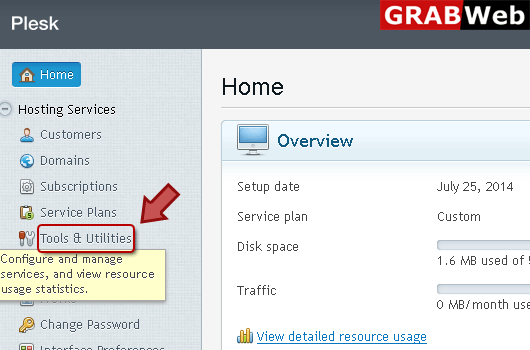
2) Click "Tools and Utilities" at the left.
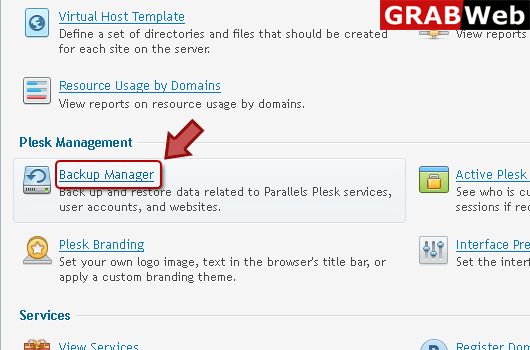
3) Click "Backup Manager" at the left.
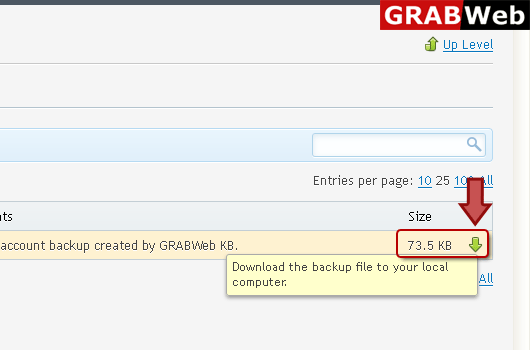
4) Click on Red marked box for download.
5) Enter Password for protection.
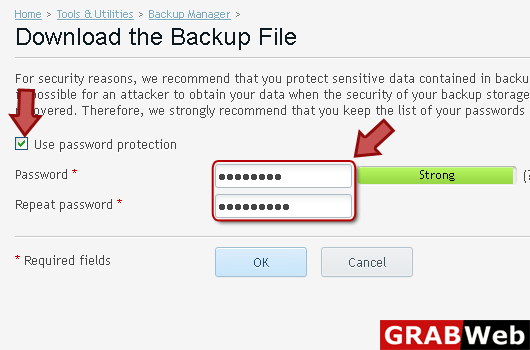
6) Click Ok.
![GRABWEB [India]](/templates/lagom2/assets/img/logo/logo_big.454175622.gif "GRABWEB [India]")
If you are going to use an FTp server for storing backup files, you should setup the control...
To backup your account with your domains:1) Login in to your Plesk Control Panel.2) Click "Tools...
To schedule backing up of data:1) Login in to your Plesk Control Panel.2) Click "Tools and...
To restore data from a backup file:1) Login in to your Plesk Control Panel.2) Click "Tools and...
To upload a backup file to a backup repository within panel:1) Login in to your Plesk Control...
