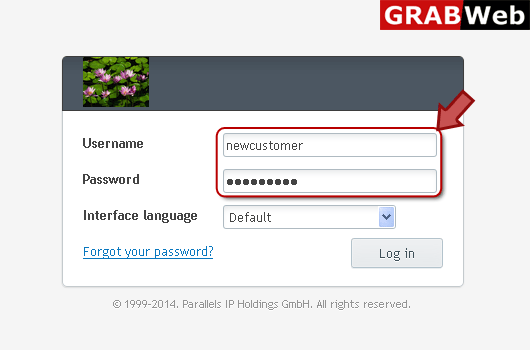
1) Login in to your Plesk Control Panel.
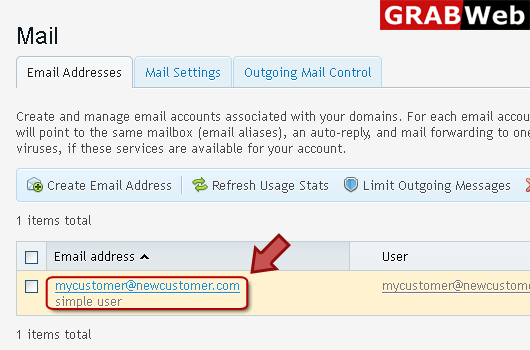
2) Click on "Mail" tab.

3) Click on email address as marked in red box.
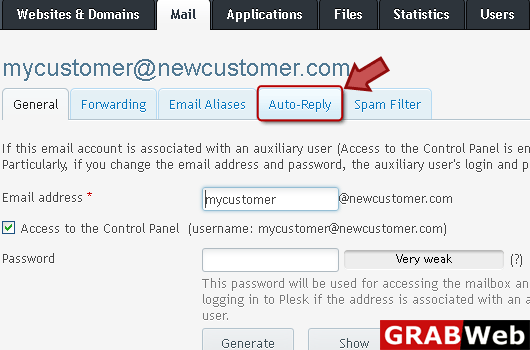
4) Click "Auto-Reply" tab as marked in red.
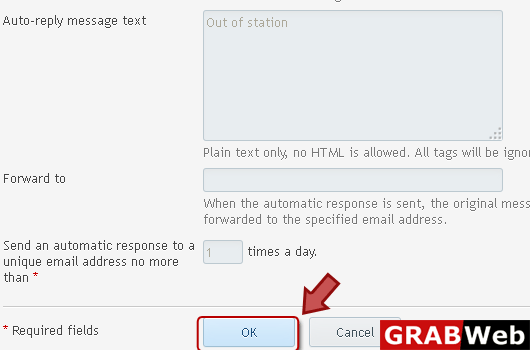
5) Uncheck the switch on auto reply box then click Ok.

![GRABWEB [India]](/templates/lagom2/assets/img/logo/logo_big.454175622.gif "GRABWEB [India]")
To configure Bounce with Message option:1) Login in to your Plesk Control Panel.2) Click on...
To deactivate mail services for a domain:1) Login in to your Plesk Control Panel.2) Click on...
To forwrd mail to the specified email address:1) Login in to your Plesk Control Panel.2) Click on...
To activate mail services for a domain:1) Login in to your Plesk Control Panel.2) Click on "Mail"...
To create an email address:1) Login in to your Plesk Control Panel.2) Click on "Mail" tab.3)...
